SDA Bytes - September 2026 Update
Welcome to our September 2026 Update!
At SDA Bytes, we’re here to help you with your corporate training needs. Tests allow you to engage with your employees to build their confidence and keep their skills current. Skill and proficiency tracking allow you to identify opportunities for growth and uncover knowledge gaps.
Since our last update, we’ve been hard at work improving usability and expanding features. Let’s review the changes:
Apple app
After almost three months of back-and-forth with Apple, we are very pleased to announce that our Apple app is now available in the App Store!

We built the app to be mobile friendly but having an app in the App store makes things more convenient.
Having an app also allows us to move forward with our plan to add device notifications in the near future so stay tuned.
List Improvements
We’ve made a few improvements to lists on the side panel of the Users, Roles & Skills, and Tests views.
The first change you’ll notice right away is how the lists are presented to make better use of available space as shown in the following image:
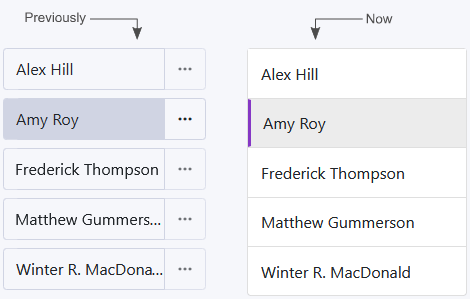
Something you may have noticed with the previous image is that the context menu buttons aren’t visible anymore. As shown in the following image, each list item’s context menu button is now only shown when you tab to, or mouse over, the list item.
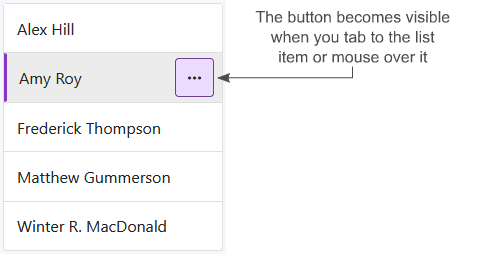
This helps make things feel less busy and, if the item’s name is long, this change allows for a bit more of the text to be visible.
Groups
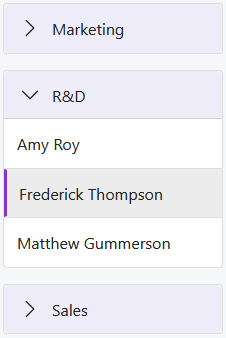
It’s now possible to define groups for the side panel items in the Users, Roles & Skills, and Tests views. As the following image shows, in the Users view this allows you to organize your users by team for example:
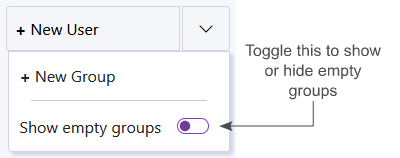
To create a new group, a menu button has been added to the right of the ‘+ New’ button as shown in the following image.
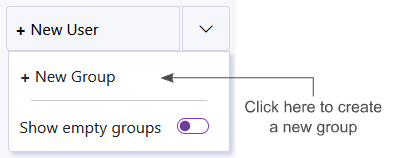
If you just created a group, it will be shown. By default, when the view loads, groups that have no items will not be shown. If you want to edit or delete empty groups that are not visible, you can toggle the Show empty groups option as shown in the following image.
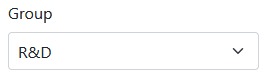
As shown in the following image, there is now a Group dropdown on the main form that allows you to move an item between groups:
Finally, to edit or delete a group, there’s a context menu button that will show up if you tab to the group or mouse over it:
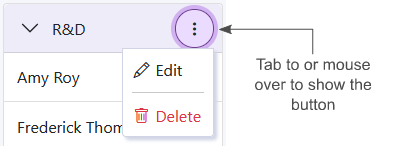
Note that the ‘No Group’ section represents all items not assigned to a group so no context menu button is available for that section.
Users view: Filter
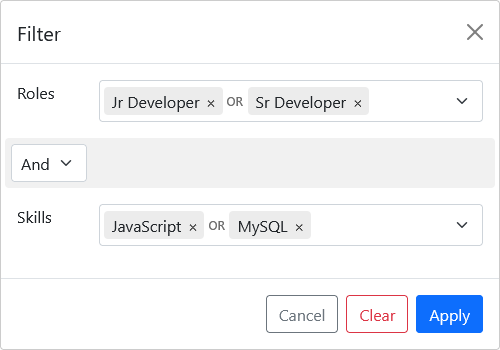
To quickly find users who have a specific role or skill, we’ve introduced a filter to the Users view. As shown in the following image, it’s now possible to filter your list of users by assigned role, skill, or a combination of the two:
Stay tuned because we have improvements planned for the filter.
Tests view: Manager
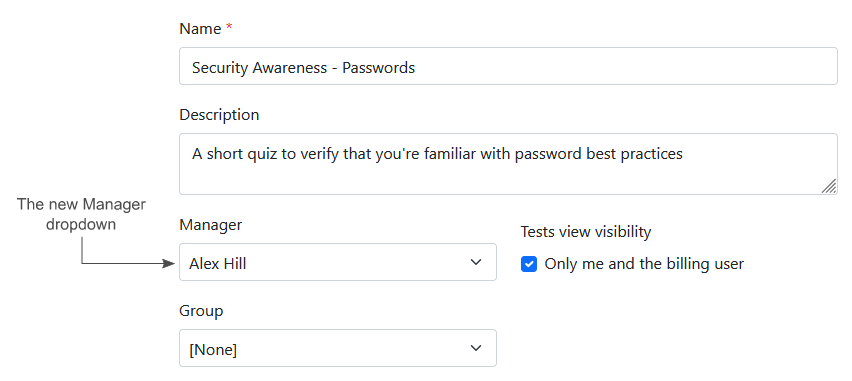
The person who creates a test is the manager by default and will receive notifications when the tests are completed. There are times, however, where one administrator might create a test while another administrator is responsible for managing it. To help with this use case, the Tests view now has a manger dropdown as shown in the following image.
Test Visibility in the Tests view
As shown in the following image, you can now hide tests from other administrators in the Tests view.
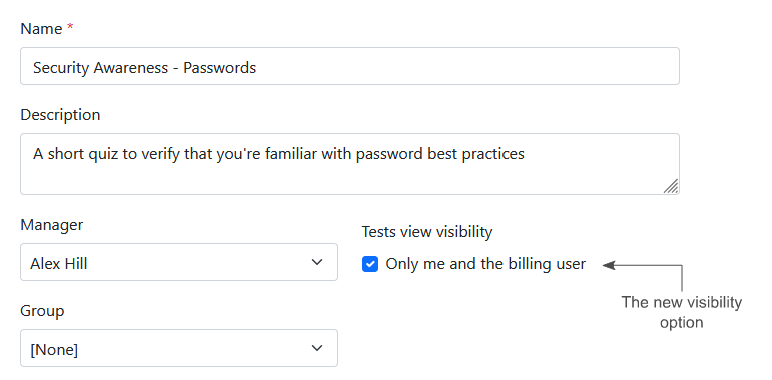
This is useful if a test is still being worked on and you don't want people to see it yet either to keep the side panel lists free of draft items or so they don’t assign users to it before it’s ready.
Another use of this feature is if other administrators need to take the test and you don't want them seeing the answers or results
In both cases, users can be assigned to the test in this state and still be able to take the test.
What’s next?
We have a lot of exciting things planned and we’re constantly curating our list to ensure we bring improvements that give you the most value. The following are just some of the enhancements that we’re aiming for in the near future:
Role dependencies
This would allow users to see what roles are associated with their current role to help understand what the next step is in their career if they’re looking to advance.
My Skills section
We plan to allow users to view other roles in the organization and see how their current skills compare to them. For example, a Junior Developer could look at how they compare to a Senior Developer and where they need to focus their learning.
Skills expanded
More improvements around skills are in the works like the ability to add notes and include links to documents that would help users with their training.
Visualization of Role and Skill progression
We plan to introduce visual elements to show a user’s role and skill progression.
API
We have an API that we’ve been refining as we improve our application. We hope to make this available soon.
Conclusion
We value your input so, if you have questions or suggestions, feel free to drop us a line: https://sda-bytes.com/contact-us
SDA Bytes is free to try for 14 days with full access to all features. No credit card is needed.
If you’d like to stay up to date with the latest updates and announcements, you can also follow us on social media: