SDA Bytes - August 2026 Update
Welcome to our August 2026 Update!
At SDA Bytes, we’re here to help you with your corporate training needs. From a simple test to verify prospects have the understanding necessary to join your team to watching your employees grow as they acquire new skills or improve proficiencies in existing areas.
Since our last update, we’ve been hard at work extending capabilities and refining features. Let’s review the changes:
Roles
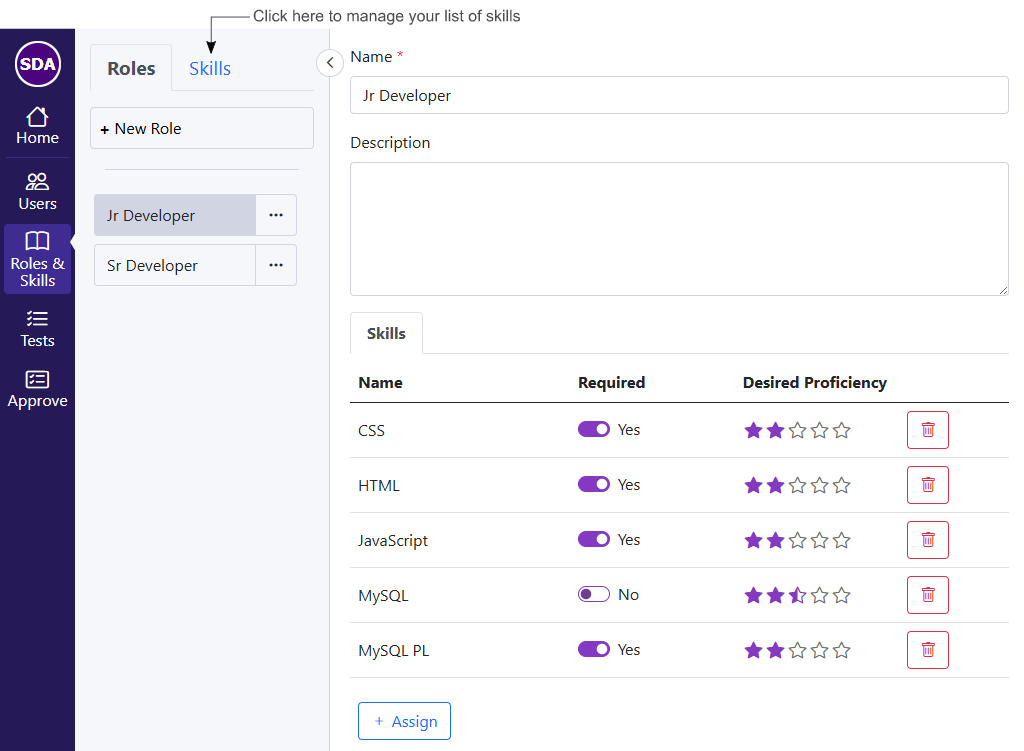
We are pleased to announce that roles are now available for Business and Premium accounts.
As shown in the following image, roles are a combination of skills where you can indicate if the skill is required or a nice-to-have. You can also set the desired proficiency of each skill for the role.
Users view
Now that roles exist, a dropdown has been added to the Users view. When a role is selected, all skills associated with the role become part of the user’s profile as shown in the following image.
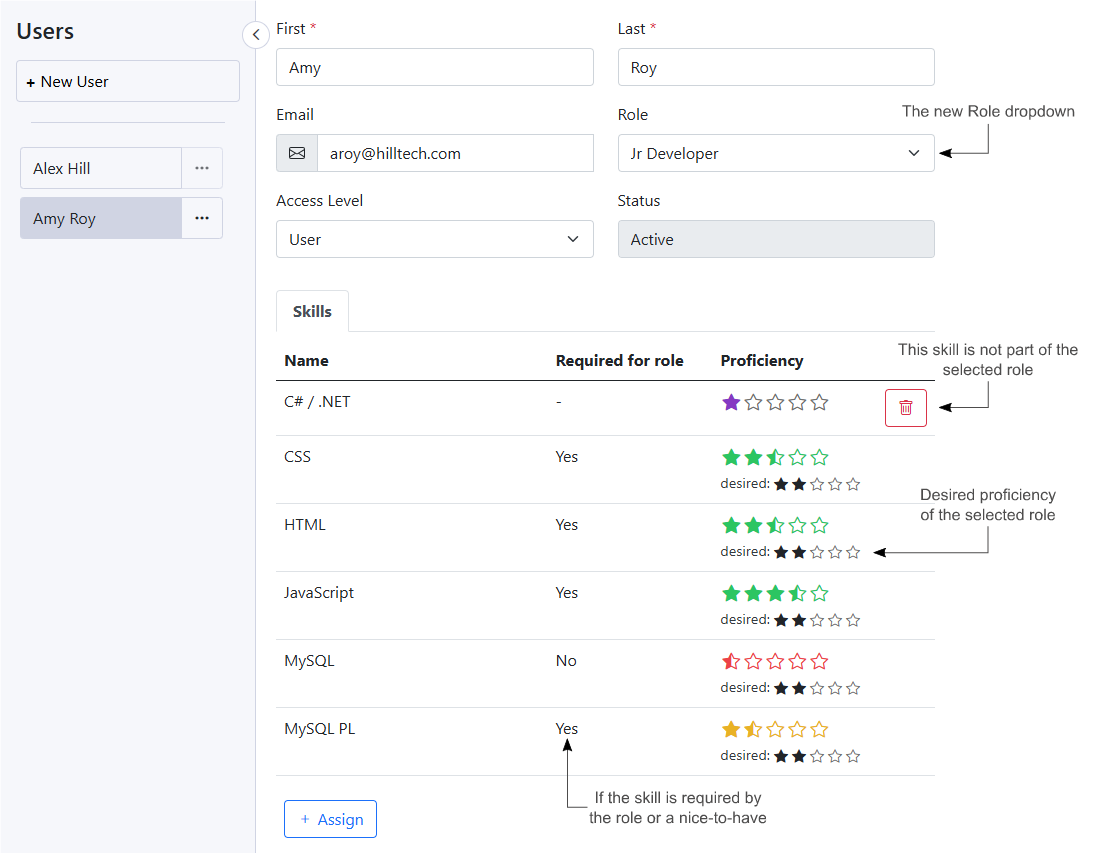
Skills let you see that your employee has a certain proficiency in an area, like problem solving or a programming language like JavaScript.
Roles allow you to see things at a higher level when viewing the user's list of skills.
If a listed skill is part of the assigned role, you’ll see a second set of stars indicating the desired proficiency for the skill defined by the role. The user’s proficiency is shown color-coded to quickly indicate how close they are to the role’s desired proficiency.
Home view - My Skills section
If you have a Business or Premium account, the Home view now includes a My Skills section as shown in the following image.
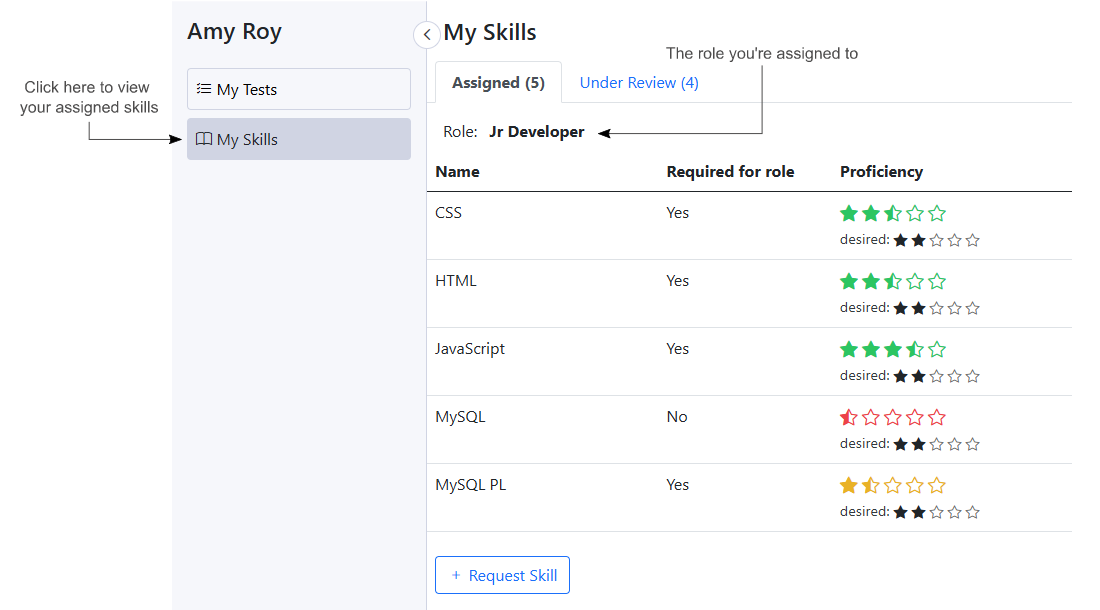
The My Skills section shows you the role you’re assigned to along with all skills assigned.
If a listed skill is part of the assigned role, you’ll see a second set of stars indicating the desired proficiency for the skill that was defined by the role. Your skill’s proficiency is shown color-coded to quickly indicate how close you are to the role’s desired proficiency.
If you don’t see a skill in the list and would like it added to your profile, you can use the ‘Request Skill’ button to bring up the dialog shown in the following image:
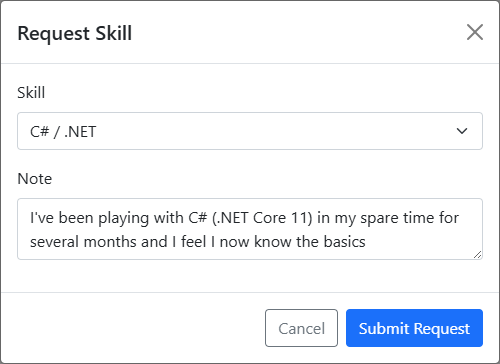
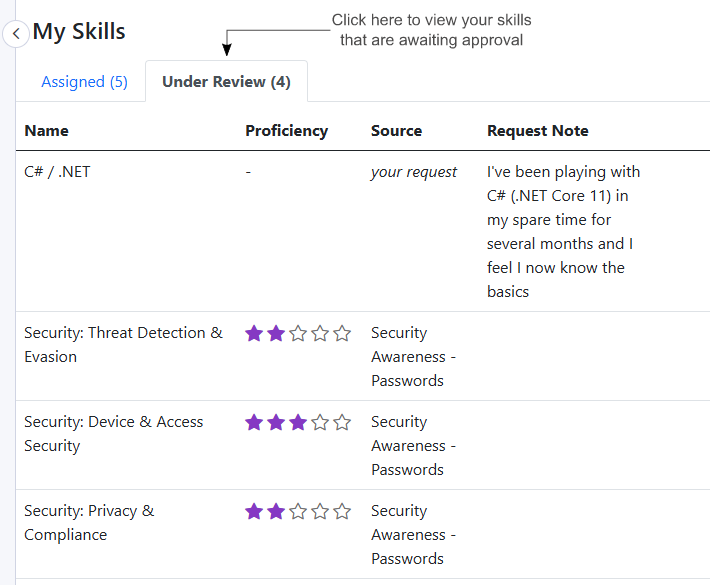
When you request a skill, an approval request is created where your manager can approve or reject the request. Also, if you pass a test that has skills assigned, those skills are also added to an approval request.
You can see the status of skills currently in the approval process by clicking on the Under Review tab as shown in the following image:
In-app Notifications
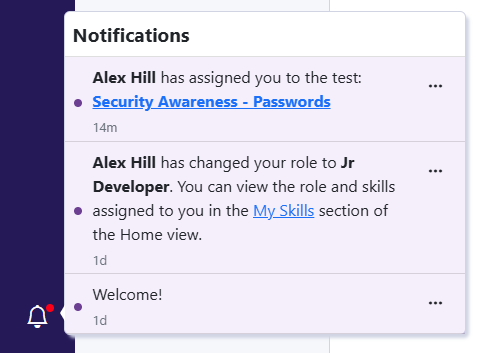
We’re pleased to announce that we now have in-app notifications that correspond to the existing email notifications. The new notification menu is shown in the following image:
Stay tuned because other improvements around notifications are in the works like the ability to receive device notifications via your Android app and the ability to configure your notification settings.
New Notifications
We’ve added some new email notifications:
- If a test is successfully completed and has skills assigned, or a user requests a skill for themselves, a notification is now sent to the manager indicating that there’s an approval awaiting their attention.
- If a skill approval is approved and it results in a new skill, or a higher proficiency for an existing skill, the user will receive a notification that the skills were approved.
All notifications sent by email are also included in the new in-app notifications menu.
What’s next?
There are many exciting things planned for this year but the following are some of the more immediate improvements that you can expect to see in the near future:
Skills
More improvements around skills are in the works like the ability to add notes and include links to documents that would help users with their learning.
Users view
We plan to add the ability to filter users by skill or role.
The idea behind the filter by role feature is that you could define a role for an upcoming project to see if you have the skills in-house, if you’re close and just need to do a bit of training, or if you need to hire. The filter would show you all users ordered by closest match.
My Skills section
One of our goals is to allow users to view other roles in the organization and see how their current skills compare. For example, a Junior Developer could look at how they compare to a Senior Developer and where they need to focus their learning.
Apple app
We have an app that is under review but the process has taken longer than expected. We're hoping to see it go live soon.
Notifications
We plan to add device notifications via the Apple and Android apps.
We also intend to give you the ability to configure how and which type of notifications to receive.
Conclusion
We value your input so, if you have questions or suggestions, feel free to drop us a line: https://sda-bytes.com/contact-us
SDA Bytes is free to try for 14 days with full access to all features. No credit card is needed.
If you’d like to stay up to date with the latest updates and announcements, you can also follow us on social media: