SDA Bytes - July 2026 Update
Welcome to our July 2026 Update!
At SDA Bytes, we’re here to help you with all your corporate training needs. From a simple test to verify prospects have the understanding necessary to join your team, or your employees understood what was taught, to watching your employees grow as they acquire new skills or improve in existing areas.
Since our last update, we’ve been hard at work improving usability and expanding features around skills. Let’s review the changes:
Percentage needed to pass a test
Because not every organization will consider a certain percentage as a pass, we wanted to give you the flexibility to decide what’s right for your organization. As shown in the following image, we’ve added an option allowing you to specify what the pass percentage is for each test.
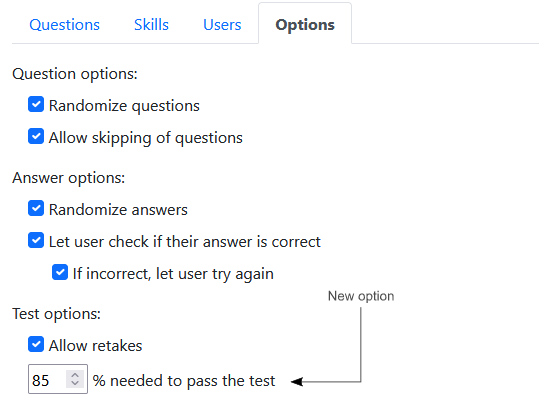
As you’ll see in the next section, this new percentage is used to determine if a test’s skills get added to an approval workflow for the user who completed the test.
Skill Approvals
We recently released a new feature allowing you to approve skills that are assigned to a test once a user successfully completes it as shown in the following image.
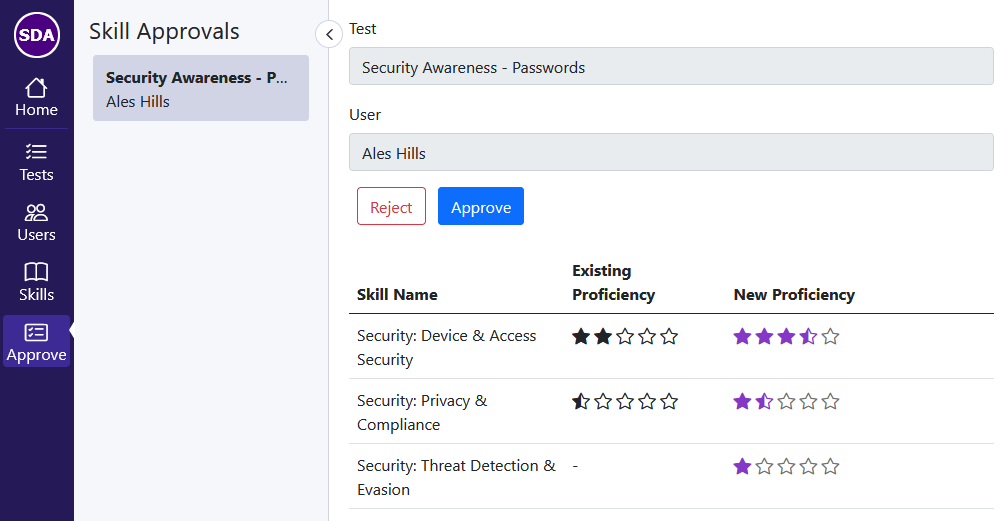
If the test has a skill with a proficiency lower than the skill already assigned to a user, that user’s skill will not be changed when the workflow is approved.
Usability Improvements for the Navigation bar
When we first released our app, the focus was around creating and taking tests so there were only a few views. We followed the style of many web apps by using icons that were self-explanatory and we included a mouse-over tooltip if you weren’t quite sure what a button’s purpose was.
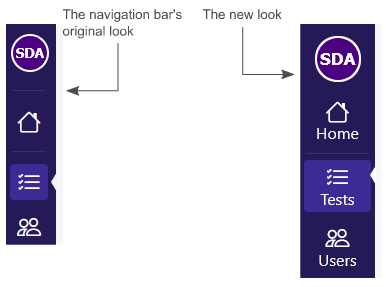
As the software has grown, additional icons have been added to the navigation bar which makes things harder to identify with a quick glance. Also, being able to see a tooltip on a mobile device is something we could have implemented but we decided against it because we felt it would be awkward to use.
We felt that giving each button a caption makes things easier to use both on desktop and mobile devices as shown in the following image.
What’s next?
There are many exciting things planned for this year but the following are some of the more immediate improvements that you can expect to see in the near future:
Apple app
We designed our app to be mobile-friendly but having a dedicated app in the app store will make accessing it even more convenient.
Stay tuned because the app has been submitted for approval. We're hoping to see it go live in the coming days.
My Tests view
The My Tests view will be expanded to give your employees more insights into what skills are assigned to them and what each skill’s proficiency currently is.
The user will also have the ability to request a skill be added to their profile. This request will enter an approval workflow similar to the skills from completed tests.
Users view
The Users view will be expanded to allow administrators to view test results and make test assignments on an employee-by-employee basis.
Skills Expanded
More improvements around skills are in the works like the ability to add notes and expirations. Expirations will enable notifications as a reminder to prepare to retake a certification exam for example.
Conclusion
We value your input so, if you have questions or suggestions, feel free to drop us a line: https://sda-bytes.com/contact-us
The SDA Bytes Quiz App is free to try for 14 days with full access to all features. No credit card is needed.
If you’d like to stay up to date with the latest updates and announcements, you can also follow us on social media: