SDA Bytes - October 2026 Update
Welcome to our October 2026 Update!
At SDA Bytes, we’re here to help you with all your corporate training needs. From a simple assessment to verify your employees understood what was taught to watching your employees grow as they acquire new skills and improve proficiencies.
Let’s review the changes since our last update:
Mobile improvements
We reached out for feedback and one area mentioned that could be improved was our mobile experience.
Navigation Bar
We tried to keep the navigation bar consistent across screen sizes so that everyone would have the same experience when using the app. As the following image shows, when it came to small screen sizes, there wasn’t always enough room for all the buttons so a More button was displayed.

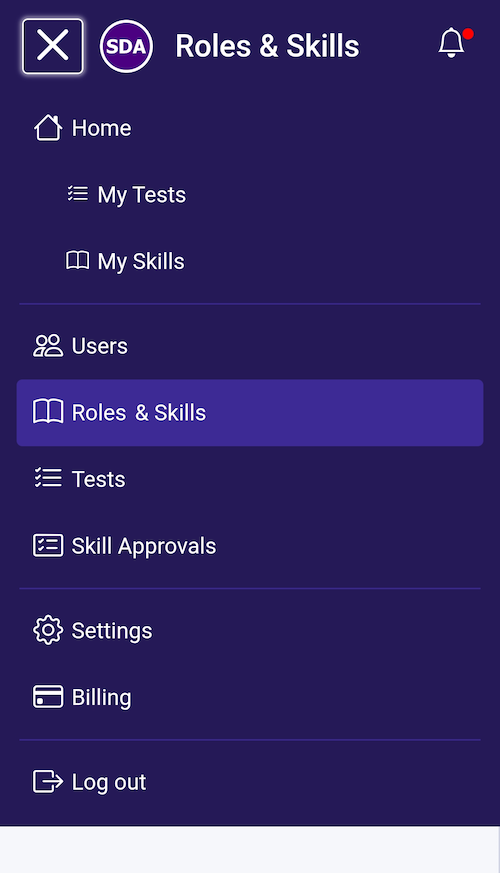
To address this on mobile, the navigation bar has been adjusted so that the views are now accessed via a hamburger menu as shown in the following image:
Side panel
The app uses a side panel, as shown in the following image, so that you can manage the items in the view.
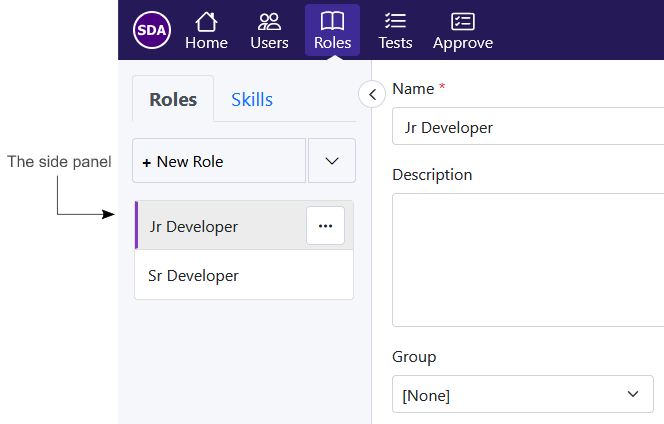
Because space is limited on a small screen like a phone, the side panel collapsed when an item was selected. While expanding the side panel to access the other items did work, it felt a little awkward.
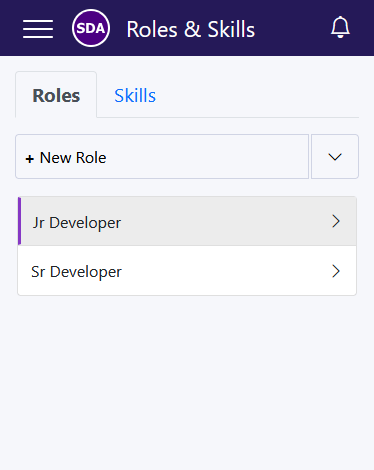
We’ve adjusted how the side panel works on mobile as shown in the following image. Now, when you navigate to a view like Roles & Skills, the side panel is displayed full screen.
Clicking on an item in the list brings you to the item’s details as shown in the following image.
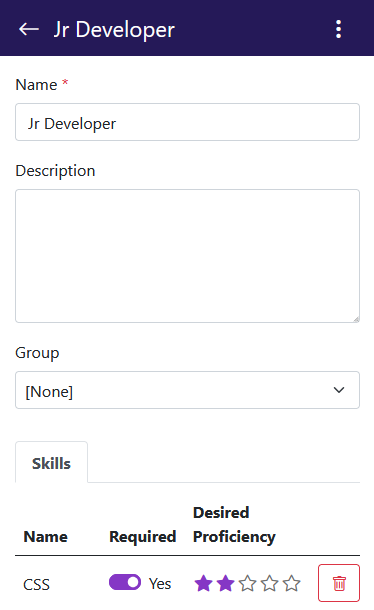
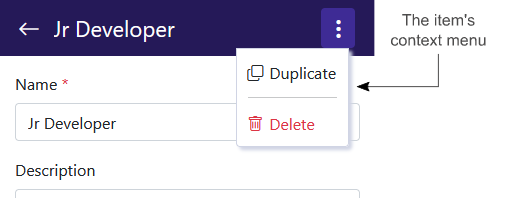
Because some views allow you to create multiple items with the same name, duplicating or deleting an item from the list view could cause issues if you accidentally selected the wrong item. As a result, as shown in the following image, on small screens there is now a context menu in the details view.
Stay tuned because additional improvements for mobile devices are planned.
Delete account option moved
While we would rather you not leave, we do understand that it’s sometimes necessary so we wanted to make the process something you could do without jumping through hoops.
We originally placed the option to delete your account in the General Settings view.
Because all other account management is found in the Billing view, it felt more logical to have this option there too. You’ll now find the option to delete your account in the Billing view.
What’s next?
We have a number of items in the works that we feel will help elevate your employees’ growth. The following are just some of the enhancements that you can expect in the coming releases:
Visualization of Role and Skill progression
We plan to introduce visual elements to show a user’s role and skill progression.
Role dependencies
This would allow users to see what roles are associated with their current role to help understand what the next step is in their career if they’re looking to advance.
My Skills section
We plan to allow users to view other roles in the organization and see how their current skills compare to them. For example, a Junior Developer could look at how they compare to a Senior Developer and where they need to focus their learning.
Skills expanded
More improvements around skills are in the works like the ability to add notes and include links to documents that would help users with their training.
API
We have an API that we’ve been fine tuning. We hope to make this available soon.
Conclusion
We value your input so, if you have questions or suggestions, feel free to drop us a line: https://sda-bytes.com/contact-us
SDA Bytes is free to try for 14 days with full access to all features. No credit card is needed.
If you’d like to stay up to date with the latest updates and announcements, you can also follow us on social media: