SDA Bytes - November 2026 Update
Welcome to our November 2026 Update!
At SDA Bytes, we’re here to help you with all your corporate training needs. From watching your employees grow as they acquire new skills or improve proficiencies in existing areas to performing a skills gap analysis to ensure your company is ready for what comes next.
Since our last update, we’ve been hard at work improving usability and expanding features. Let’s take a look at the recent changes:
Users and My Skills view improvements
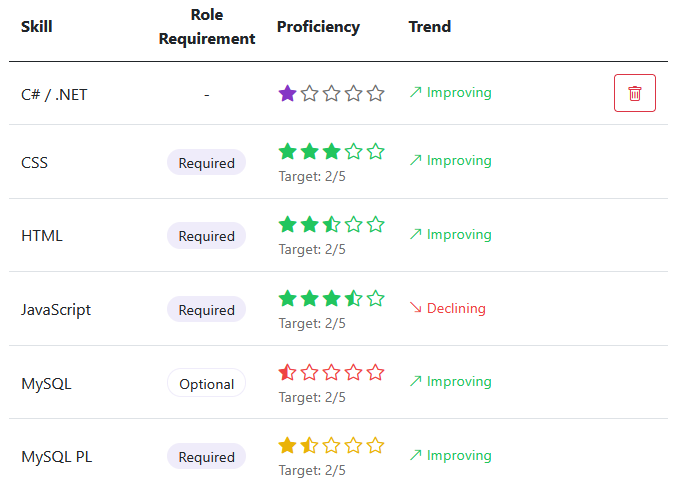
We’ve made some improvements to the look of the skills lists in the Users and My Skills views. As shown in the following image, we’ve also added a visual indicator of each skill’s trend so that you can quickly tell how your employees are doing at a glance.
Stay tuned because we have a skill history dialog in the works that will show a chart of the skill’s progression over time.
Skill list enhancements for mobile
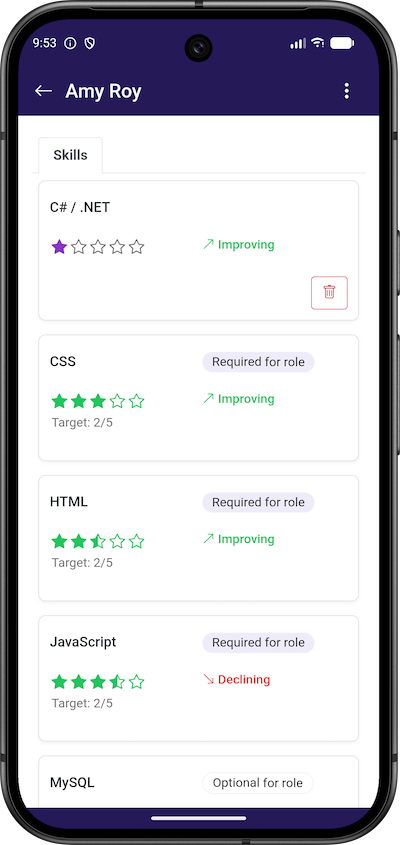
Grids are helpful when looking at multiple items and their related data. On a mobile device, however, the amount of horizontal space is quite small compared to a desktop. If there’s too much horizontal data in a grid on mobile, having to scroll horizontally makes it harder to review the information.
To enhance the mobile experience, we’re pleased to announce that the skill grids in the Users and My Skills views now display as cards on small screens as shown in the following image:
Users view: Filter upgrade
To help you quickly find users with specific skill proficiencies, we’ve upgraded the filter dialog to now allow filtering by proficiency as shown in the following image.
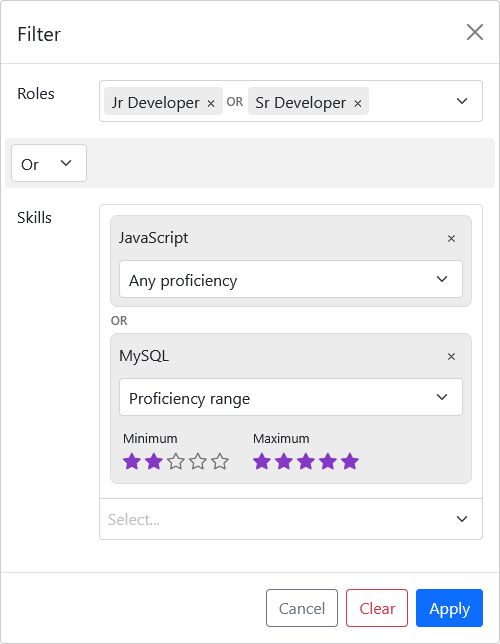
Each skill can now be filtered by ‘Any proficiency’, a ‘Specific proficiency’, or a ‘Proficiency range’.
Test results now indicate if a test was passed or not
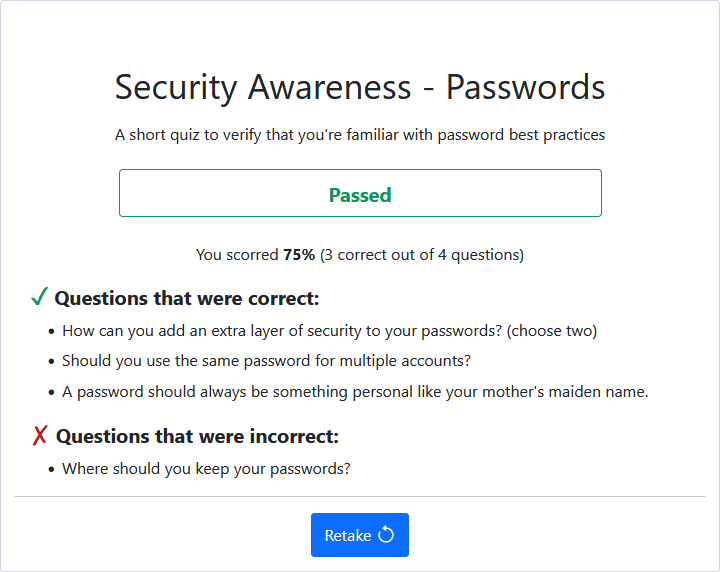
Because the pass percentage for each test can be different, it wasn’t always clear if the test was passed or not. This was especially true for non-administrator users because they don’t have the ability to check the test’s options to see what the percentage is set to.
Now, as shown in the following image, the test’s results include a section indicating if it was passed or not.
The email and in-app notifications to managers now also indicate if the test was passed or not.
Test results: Correct after a retry
We made another change in relation to the test results.
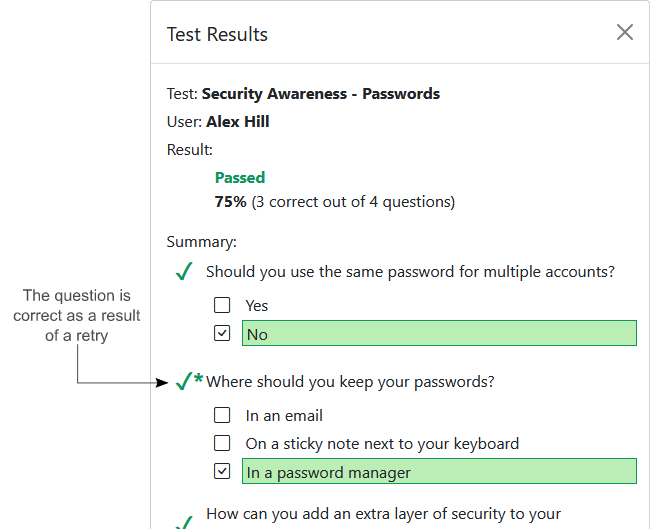
Previously, if you turned on the option allowing your employees to check if their answer is correct, as well as the option to let them try again, the test summary would show the question as correct if they found the correct answer. There was no indication that the user chose the wrong answer on their first try.
Now, as the following image indicates, if the question is correct as a result of a retry, a checkmark followed by an asterisk is shown.
What’s next?
We have a number of items in the works that we feel will help elevate your employees’ growth and more easily meet the needs of a changing world. The following are just some of the enhancements that you can expect in the coming releases:
Visualization of Role and Skill progression
As part of this goal, we plan to take skill trends even further by allowing you to see a chart of a skill’s progression over time and view the history of the changes.
Role dependencies
This would allow users to see what roles are associated with their current role to help understand what the next step is in their career if they’re looking to advance.
My Skills section
We plan to allow users to view other roles in the organization and see how their current skills compare to them. For example, a Junior Developer could look at how they compare to a Senior Developer and where they need to focus their learning.
Skills expanded
More improvements around skills are in the works like the ability to add notes and include links to documents that would help users with their training.
Conclusion
We value your input so, if you have questions or suggestions, feel free to drop us a line: https://sda-bytes.com/contact-us
SDA Bytes is free to try for 14 days with full access to all features. No credit card is needed.
If you’d like to stay up to date with the latest updates and announcements, you can also follow us on social media: